What Is MCP? How Model Context Protocol Lets AI Agents Use Your Software
Saadaan Hassan • September 24, 2026 • 14 min read
What Is MCP? How Model Context Protocol Lets AI Agents Use Your Software
AI models are getting good at reasoning. That was never really the bottleneck. The bottleneck has always been access — a model can be extremely capable and still be unable to look up an order, check a database, or create a record in your system, because it has no defined way to reach any of that.
So the practical question isn't "how smart is the model." It's:
How do you give an AI agent controlled access to the systems it actually needs to do useful work?
Model Context Protocol (MCP) is one answer to that question. Not the only one, and not a magic one — it's a protocol, which means it standardizes how an AI application talks to your tools, not whether you've built those tools well. I recently built a small MCP server for my own portfolio site and connected it to Claude, and that project is a decent lens for explaining what MCP actually does and doesn't do.
What is MCP?
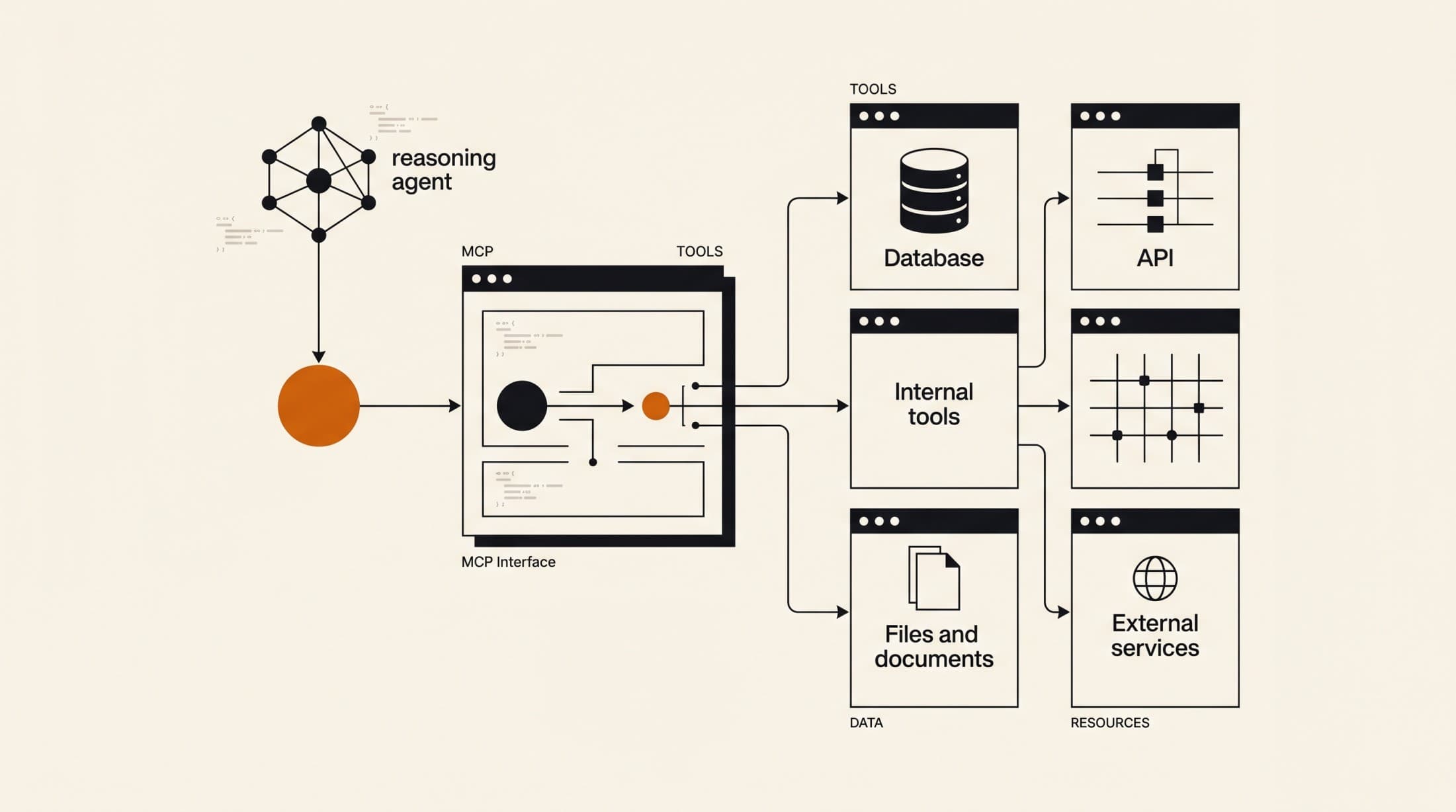
Model Context Protocol (MCP) is an open protocol that standardizes how AI applications discover and call tools, read resources, and use predefined prompts exposed by a separate server process. Instead of every AI client implementing its own bespoke way of talking to your software, it talks to an MCP server, and the server exposes a consistent interface the AI can query and use.
At the simplest level:
AI Application
      ↓
     MCP
      ↓
Your tools / data / services
The AI application (Claude Desktop, Claude Code, an IDE, whatever) acts as an MCP client. It connects to one or more MCP servers. Each server advertises a set of capabilities — tools it can call, resources it can read, prompts it can use — and the client's model decides, at runtime, when to use them based on the conversation.
The useful property here isn't that this is technically hard to build yourself. It's that it's standardized. Without a shared protocol, if you want three different AI tools to be able to use your system, you write three different integrations, each with its own auth handling, its own way of describing available actions, its own request/response shape. With MCP, you write one server, and any MCP-compatible client can talk to it the same way. I saw this firsthand — I wrote one server and it works, with the same code, against Claude Code, Claude Desktop, and Codex CLI, just by pointing each client's config at the same process.
MCP vs. traditional API integrations
This is where people sometimes get the wrong idea — that MCP replaces APIs. It doesn't. It sits in front of them.
A traditional custom AI integration usually looks like this:
Traditional approach:

AI application
      ↓
Custom integration
      ↓
API
      ↓
Your application
You write glue code specific to one AI provider's function-calling format, wire it to your existing API, and repeat that glue code for every other AI client you want to support.
The MCP approach re-shapes the top of that stack, not the bottom:
MCP approach:

AI application
      ↓
MCP client
      ↓
MCP server
      ↓
Tools / resources / prompts
      ↓
Your systems
What changes: the interface between the AI and your capabilities becomes standardized and discoverable. The AI client can ask "what tools do you have?" and get a structured answer, instead of you hardcoding a function schema for one specific model provider.
What doesn't change: your actual backend. Your database is still your database. Your business logic still lives where it lived. Your auth system is still your auth system. An MCP server is a new front door, not a replacement for the house behind it. In my case, the MCP server doesn't talk directly to a database — it calls into the same Supabase Auth and Postgres setup my admin panel already uses. The server is a thin, purpose-built layer on top of infrastructure that already existed.
What can an MCP server expose?
MCP defines a few primitive capability types. You don't have to use all of them — most real servers lean heavily on one or two.
Tools — functions the AI can call, with defined inputs and outputs. This is the part that gets the most attention because it's where the AI actually does things.
Tools:
- create_customer
- search_orders
- generate_report
Resources — read-only content the AI can pull into context: documents, configuration, structured data.
Resources:
- project documentation
- database information
- configuration/context
Prompts — predefined, reusable instructions or workflows a client can surface, so common tasks don't need to be re-explained from scratch every time.
Prompts:
- predefined workflows or instructions
My server, for example, only uses tools — no resources, no custom prompts. That's a completely valid shape for an MCP server. The protocol gives you the primitives; your job is picking which ones your use case actually needs.
My first MCP server
I wanted Claude to be able to draft content for my portfolio site — blog posts and case studies — without me having to build a one-off integration just for that. Rather than wiring a custom API call into whatever AI client I happened to be using that day, I built an MCP server that exposes a small, specific set of capabilities, and pointed my AI clients at it.
The server is local — it runs on my machine over stdio, not as a hosted network service. That was a deliberate architectural choice, not a default. It means it can only be reached by clients running on my machine (Claude Code, Claude Desktop, Codex CLI), not by any cloud-hosted assistant. Exposing it over the network would mean building and maintaining authenticated remote access, which is a meaningfully bigger security surface than a stdio-based local server, and I didn't want that surface for something that only I use.
Before writing any tool, the actual design work was answering a handful of questions:
- What capability did I actually want Claude to have? (Draft content, not manage content.)
- What should be exposed as a tool, and what should stay completely inaccessible?
- What inputs does each tool need, and what should it validate before touching anything?
- What does the tool return, and is that enough for the AI to usefully report back to me?
- What happens when something fails — bad input, an auth problem, a downstream error?
Those questions mattered more than the code. The code — a Node/TypeScript server using the MCP SDK, authenticating to Supabase — was the easy part once the interface was decided.
The interesting part isn't exposing a function
Here's the thing nobody tells you going in: wiring up a function isn't the hard part. Anthropic's SDK, the MCP spec, all of that is well documented. The actual engineering problem is designing an interface that's safe and legible for an AI agent to use — which is a different problem than designing an interface for a human developer reading your API docs.
There's a real difference between exposing something like:
execute_database_query()
and exposing:
create_draft_post()
The first hands the agent a general-purpose weapon and trusts it to use it responsibly, every time, forever. The second gives it one constrained, well-understood capability that can't be misused into something else. An agent calling create_draft_post cannot accidentally (or via a bad prompt, or a hallucinated argument) delete a row, read unrelated data, or publish something live. The blast radius of a mistake is bounded by the interface itself, not by hoping the model behaves.
That shaped every tool I built:
- Clear, narrow inputs.
create_draft_posttakes title, excerpt, content, tags, SEO fields — not a free-form payload. - Enforced boundaries below the tool layer. The database role this server authenticates as literally has no SELECT, UPDATE, or DELETE permission on the content tables — only INSERT, and only rows where
status = 'draft'. That's enforced by Postgres row-level security, not by the tool's own logic. Even if I wrote a bug into the tool code, the database itself refuses anything outside those bounds. - Predictable output. Each write returns the slug of what it created, so the response the AI gives back to me is something I can actually go check.
- Auditability. Every row created through this path is tagged
created_via = 'mcp', so AI-generated drafts are distinguishable at a glance from anything created through the admin UI.
None of that is exotic. It's the same discipline you'd apply to any API meant to be called by code you don't fully trust — the difference is that here, the caller is a language model interpreting natural-language intent, which makes the constraints matter more, not less.
MCP and AI agents
MCP gets more interesting once you stop thinking about a single tool call and start thinking about an agent that can chain several together.
A chatbot mostly produces text. An agent can do something closer to:
Understand request
      ↓
Decide what information it needs
      ↓
Call a tool
      ↓
Receive result
      ↓
Reason about result
      ↓
Call another tool
      ↓
Complete task
Picture a request like: "Find customers whose invoices are overdue and prepare a summary." An agent with the right tools available might work through it as:
search_customers()
        ↓
get_overdue_invoices()
        ↓
analyze_results()
        ↓
generate_summary()
Worth being precise here: MCP itself doesn't do any reasoning. It doesn't decide to call get_overdue_invoices after search_customers. That decision is made by the model, based on the tool descriptions it was given and the state of the conversation. MCP's job is narrower — it standardizes how the agent discovers those tools exist and how it invokes them. The intelligence is still entirely on the model side; MCP just gives that intelligence a consistent way to reach out and act.
My own server is a single-hop example of this — one tool call, one write, done. But list_published_content exists specifically so an agent can chain: check what's already published before drafting something new, so I don't end up with three drafts covering the same topic because nothing looked first.
Security becomes more important, not less
It's tempting to talk about MCP purely as a productivity story — "now Claude can do things for you!" That framing skips the part that actually matters: you're handing a language model the ability to take real actions against real systems, and the model doesn't have intent the way a human operator does. It has whatever the current conversation nudges it toward, which can include prompt injection, misunderstood instructions, or just a bad inference from ambiguous input.
Concepts worth taking seriously here, none of them new to security work generally but all of them newly relevant when the caller is an LLM:
- Authentication — is the server even confirming who or what it's talking to?
- Authorization — separate from authentication: what is this specific caller allowed to do?
- Least privilege — the credential should be capable of exactly what's needed and nothing else.
- Input validation — don't trust that the model will always produce well-formed arguments.
- Sensitive data exposure — should this tool be able to return data it doesn't need to?
- Tool-level permissions — not every tool needs the same access level as every other tool on the same server.
- Audit logging — you want a record of what an AI-driven action actually did.
- Rate limiting — an agent in a loop can call a tool far faster than a human would.
- Destructive operations — read and write are not the same risk category, and delete is not the same risk category as either.
- Human approval for sensitive actions — some actions probably shouldn't be fully autonomous, regardless of how good the model is.
My server is a useful small case study precisely because it's deliberately over-constrained relative to what it could do. It authenticates as a dedicated Supabase Auth user with one role, and that role is limited by Postgres row-level security to inserting drafts — not published content, not updates, not deletes, not reads. If those credentials leaked, the worst outcome is someone creating junk draft rows I'd see and delete in the admin panel. They couldn't read a single row of real data, let alone modify or publish anything. That's not incidental — it's the actual design decision the whole server is built around. A tool that can read data is a fundamentally different risk than a tool that can write it, and a tool that can write drafts is a fundamentally different risk than one that could publish or delete. The interface you expose to an AI agent should visibly reflect that difference, not paper over it.
MCP is not a replacement for good architecture
None of this removes the need for the fundamentals. You still need:
- APIs
- Authentication and authorization
- Databases
- Backend services
- Permission systems
- Input validation
- Observability
- Clear system boundaries
MCP doesn't replace any of that — it becomes another interface into it. A useful way to think about where it fits:
                Human users
                     ↓
                 Web / App
                     ↓
                  Backend
                ↙        ↘
             APIs       MCP
                         ↓
                    AI agents
Your backend serves two front doors now instead of one — the traditional API surface for humans and human-driven clients, and an MCP surface for AI agents. Both should be held to the same standards of validation, authorization, and least privilege. Neither gets a pass because "it's just for AI."
When should you actually use MCP?
MCP tends to make sense when:
- More than one AI client needs access to the same set of capabilities.
- You want a standardized, discoverable interface specifically for AI consumers.
- You're building genuinely agentic workflows — multi-step, tool-chaining behavior, not a single API call.
- You want to expose internal tooling to AI systems in a controlled way.
- You already have a backend or API and want to selectively surface parts of it to AI clients.
It tends to make less sense when you have one AI client, one simple use case, and a single API call would do the job. In that case, MCP adds a server process, a protocol layer, and configuration overhead for a problem a direct API call already solved. Reach for it when the standardization actually buys you something — multiple clients, multiple tools, or a workflow that benefits from the AI discovering capabilities dynamically rather than you hardcoding one call.
What I learned from building one
A few things stuck with me more than I expected going in:
Tool design is the real work, not the wiring. Getting Claude to see a tool at all takes minutes. Deciding what that tool should and shouldn't be able to do took most of the actual thinking.
This is a software architecture problem wearing an AI costume. Scoping a credential, enforcing constraints at the database layer instead of trusting application code, thinking about failure modes — none of that is new. It's the same discipline as designing any API for an untrusted or semi-trusted caller. The fact that the caller is a language model doesn't change the discipline; it raises the cost of skipping it.
Boundaries matter more when the caller can't be fully predicted. A human hitting your API made a deliberate choice to call that endpoint with those parameters. A model decides that in the moment, based on a conversation you don't fully control. Designing for that means assuming the tool will eventually get called with something unexpected, and making sure the blast radius of that is small regardless.
Standardized interfaces are genuinely reusable. I didn't write separate integration code for Claude Code versus Claude Desktop versus Codex CLI. I wrote one server and pointed three different config files at it. That's the actual practical payoff of the protocol, separate from any AI hype around it.
The bigger shift I'd point to isn't that AI can now "do things." It's that giving AI access to real systems is turning into an ordinary software design problem — inputs, outputs, permissions, failure handling — rather than a special AI problem with its own rules. MCP is a decent, well-thought-out piece of plumbing for that. It's not the interesting part on its own. The interesting part is still the same thing it's always been: deciding, carefully, what you're willing to let something call.
More Blogs

Enjoyed this one?
Get in touch if you're building something and want a second opinion on the architecture.